Hob
Control Panel
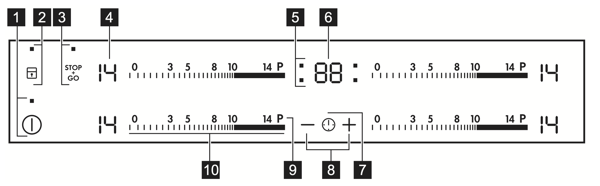
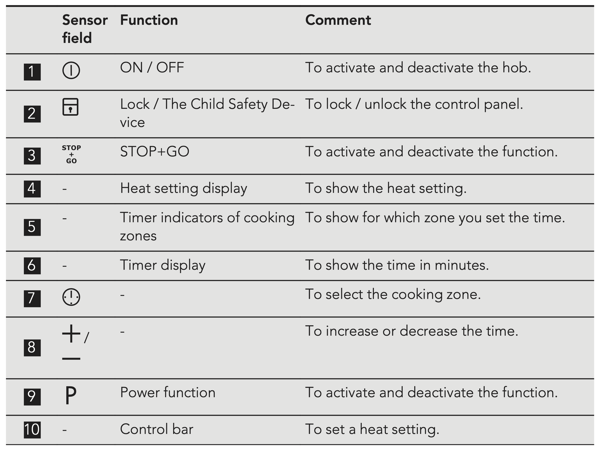
Use the sensor fields to operate the appliance. The displays, indicators and sounds tell which functions operate.
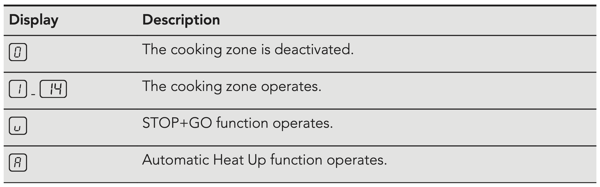
Heat settings
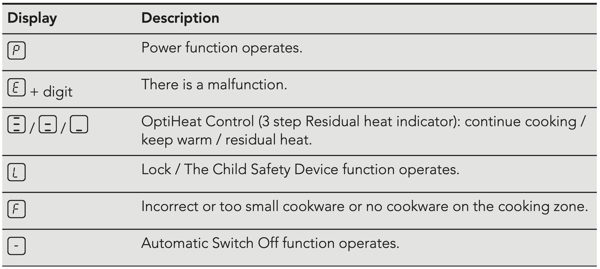
Lock
You can lock the control panel while cooking zones operate. It prevents an accidental change of the heat setting.
Set the heat setting first.
To activate the function: touch  .
.  comes on for 4 seconds. The Timer stays on.
To deactivate the function: touch . The previous heat setting comes on.
Child Safety
This function prevents an accidental operation of the hob.
To activate the function: activate the hob with  . Do not set the heat setting. Touch for 4 seconds. comes on. Deactivate the hob with .
To deactivate the function: activate the hob with . Do not set the heat setting. Touch for 4 seconds.  comes on. Deactivate the hob with .
To override the function for only one cooking time: activate the hob with . comes on. Touch for 4 seconds. Set the heat setting in 10 seconds. You can operate the hob. When you deactivate the hob with the function operates again.